

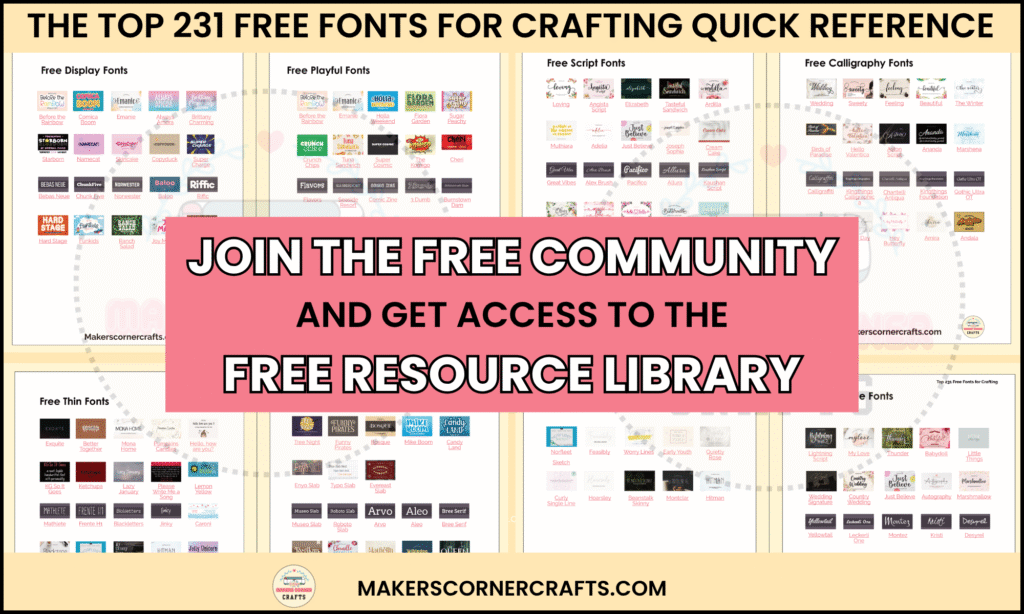
Are you looking for the best free fonts for Cricut crafting? Look no further, as I have got you covered. I have compiled a list of the 215 most popular free fonts available online from five online vendors.
With this comprehensive collection of free fonts for Cricut, you can take your crafting skills to the next level.
Go straight to the list of fonts.
- Font Vendors
- Cricut and System Fonts
- Font File Types
- What are the different Types of Fonts?
- What are the Different Font Styles?
- The Best Free Fonts for Cricut Overall
- The Best Free Fonts for Cricut by Style
- The Best Free Single-Line Handwriting Print Fonts
- The Best Free Cursive Fonts
- The Best Free Script Fonts
- The Best Free Calligraphy Fonts
- The Best Free Serif Fonts
- The Best Free Sans Serif Fonts
- The Best Free Thin Fonts
- The Best Free Slab Serif Fonts
- The Best Free Display Fonts
- The Best Free Playful Fonts
- The best Gothic or Blackletter Fonts
- The Best Fonts by Craft Type
- Licensing Considerations
- Frequently Asked Questions
- Conclusion
This post may contain affiliate links, which means I’ll receive a commission if you purchase through my links, at no extra cost to you. Please read the full disclosure for more information.
Font Vendors
Where can I find free fonts for Cricut?
You can find free fonts for Cricut online just about anywhere. You want to source the fonts you use from a trustworthy vendor that pays its designers and provides proper licensing. I recommend five font vendors to get your fonts from. There are many vendors that are trustworthy, so this vendor list is not all-inclusive. These are popular font vendors that you can rely on.
Where can I buy fonts?
You can buy a font individually and in bundles from many online vendors. Some vendors have a paid subscription model where you can access tens of thousands of fonts. Below is a list of popular font vendors that I recommend. It’s not an all-inclusive list, but these font vendors are good and trustworthy.
Cricut.com
Cricut sells fonts individually and by subscription. The Cricut Access subscription gives you access to all of Cricut’s fonts. Cricut also provides a number of fonts for free for you to use out of the box, which I will discuss later.
If you aren’t sure if Cricut Access is a good choice for you, read my post, Cricut Access Subscription: Do You Need It?
Creative Fabrica
Creative Fabrica sells fonts individually and in bundles. They also have the All-Access subscription, which gives you access to over 100,000 fonts.
You can learn all about Creative Fabrica and what they have to offer in my post, Creative Fabrica: Fonts, Designs and More.
Adobe
Adobe provides more than 20,000 fonts for its Creative Cloud subscriptions. There are subscription models for single programs and all applications.
Creative Market
Creative Market has monthly and annual subscriptions where you can get up to 20% off of their design assets. They also sell fonts individually and in bundles.
FontBundles
Fontbundles sells fonts individually and in bundles, and they have a subscription model as well.
What do I use?
I have a Cricut Access subscription, a Creative Fabrica All-Access subscription, and an Adobe Creative Cloud subscription.
Creative Fabrica All-Access subscription is only $47 for the entire year, and it comes with a ton of features and tools like classes, Cricut and Silhouette crafts, laser crafts, an AI art generator, needlepoint designs, Creative Fabric Studio and the new AI Font Generator.
I tend to get most of my fonts from Creative Fabrica. Learn more about what you can get with Creative Fabrica’s All-Access subscription in my post, Creative Fabrica Fonts, Designs, and More.
Cricut and System Fonts
Cricut provides Cricut fonts and system fonts in the font area in Cricut Design Space.
Cricut Fonts
How to Access Cricut Fonts

- Go to the Cricut Design Space canvas. Make sure you are logged into your Cricut account in Cricut Design Space.
- Click on the text feature on the left-hand side of the screen to add text to the Design Space canvas.
- Select the text box and then click on the drop-down under Font in the toolbar at the top of the screen.
- Select the Cricut tab.
- A list will populate with Cricut fonts.
Purchase Fonts Individually from Cricut

Fonts with a price next to them need to be purchased individually for use. You will see prices listed for fonts even if you have Cricut Access because some fonts have an extra cost, like Disney fonts.
Purchase a Cricut Access Subscription

If you have a Cricut Access subscription, the fonts with a designated “green a” next to them are available for you to use. All of these fonts with the “green a” next to them are Cricut Access fonts. You will still see a few fonts listed with a price, even if you have Cricut Access, like the Disney font.
Use Free Fonts for Cricut

Cricut also provides many great, free fonts for Cricut Design Space. These fonts are listed under the Cricut tab but do not have a price next to them. You can get a quick list of free fonts for Cricut using the font filter in the font area. Open the font filter and click “Free” and “Cricut.” This will show you a list of free Cricut Fonts that you can use.

Cricut adds new fonts all the time, and this list is a sample of what’s available for you to use for free.
Cricut fonts come in many styles. For example, there are Cricut script fonts, serif and sans-serif fonts, and display fonts. The best Cricut fonts will fit your project’s needs and be aesthetically pleasing.
System Fonts

System fonts are installed on your computer by the operating system and/or third-party programs, like Microsoft Office. Fonts that you purchase individually or get through a subscription are also installed under system fonts. These also include your own fonts downloaded and installed from font vendors.
Microsoft installs many fonts for its operating system and programs like Microsoft Word. You can use these fonts commercially as long as they are not embedded and/or can be extracted from your product.
For example, you can make and sell t-shirts, mugs, tumblers, and more using fonts provided by Microsoft. You cannot distribute or make the font files available. Learn more about Microsoft fonts from Microsoft.com.
The Apple forums can get a little convoluted, but Apple ultimately follows the same line as Microsoft. Learn more on Apple’s website.
Always double-check to ensure you have proper usage rights for any fonts you use commercially. You are responsible for adhering to font license requirements, even when they are not explicitly stated.
Font File Types

Fonts come in different file types. The two that you will see most often are OTF (OpenType Font) and TTF (TrueType Font.) You can learn more about these file types in my post, The 40 Best Fonts for Cricut Writing.
What are the different Types of Fonts?

Font types are called typefaces. There are many different typefaces, and you’ve probably heard of at least two: serif fonts and sans-serif. Here are a few other typefaces. This is not an all-inclusive list.
- Handwritten
- Script
- Display
- Blackletter
- Slab Serif
What are the Different Font Styles?

Font styles describe the font’s look and feel. Font vendors may use different words for the font styles. Here are a few font styles you may see online at different font vendors.
- Decorative
- Groovy
- Retro
- Cartoon
- Comic
- Typewriter

The Best Free Fonts for Cricut Overall
Each of these fonts has a personal use license. Some have commercial rights, but most do not. Read the font license to determine if you can use it for your intended project.
All the fonts listed in this post come from four popular and trustworthy vendors:
These are the most popular free fonts for Cricut overall from all four vendors.
Creative Fabrica


Da Font


Font Squirrel


FontBundles


The Best Free Fonts for Cricut by Style
Below are the most popular fonts by font style. There is some overlap between the typefaces, so you may see a font listed more than once in different font types.
The Best Free Single-Line Handwriting Print Fonts
These free writing fonts are single-line fonts that look like handwriting. Use handwriting fonts with Cricut pens and markers to make gorgeous invitations, greeting cards, and labels.


The Best Free Cursive Fonts
These fonts are the most popular cursive fonts from the four vendors. Although these fonts are not single-line, they are intended to look handwritten when cut from materials like adhesive vinyl and HTV. You will see some overlap with these and the calligraphy and script fonts.


The Best Free Script Fonts
Script fonts are identical to Cursive fonts for the most part. It can be hard to find single-line script and cursive fonts, but there are many popular script and cursive fonts that have a bit of weight or width that you can use with materials like adhesive vinyl and HTV.


The Best Free Calligraphy Fonts
Calligraphy fonts are also similar to cursive and script fonts and include single-line and lightweight-width fonts. You can use these fonts for all types of crafting.


The Best Free Serif Fonts
Serif fonts have little ticks or endings on the ends of the letters. Serif fonts come in many styles also. They can be tricky to weed in small designs. Use serif fonts that have a bit of weight, or width, to them when cutting vinyl. They look great with most crafts.


The Best Free Sans Serif Fonts
Sans-serif fonts are clean and simple, with no ticks or embellishments on the ends of the characters. Sans-serif fonts also belong to many different font styles. You can use sans-serif fonts on most crafts. They are easy to weed when they have a bit of weight or width to them and look fabulous on most crafts.


The Best Free Thin Fonts
Thin fonts can be single-line fonts or fonts with width but are best described as tall and thin. Thin fonts look great on labels and invitations.


The Best Free Slab Serif Fonts
Slab serif fonts are thick and have serifs or ticks off the ends of the characters. Like general serif fonts, these can be hard to weed when they are small. Use these fonts with a bit of width to them, and they will weed easily and beautifully for all kinds of crafts.


The Best Free Display Fonts
Display fonts are decorative and bold, and they are also usually thick fonts. They are used for everything from signage to Playbills and graphics that need to stand out. Display fonts can have intricate cuts within the lettering and look almost like art.
I like to use display fonts when I create Pinterest pins and Instagram posts. Select display fonts with weight for vinyl weeding.


The Best Free Playful Fonts
Playful fonts are whimsical and fun. They can belong to many different typefaces, like Display and Handwritten.


The best Gothic or Blackletter Fonts
Gothic or blackletter fonts are a special font style reminiscent of Middle Ages lettering. They are usually big, highly decorative, and resemble old-school calligraphy. These look great on posters, stickers, invitations, and more.


The Best Fonts by Craft Type
The Best Fonts for Intricate Cuts

Making intricate cuts with your Cricut machine can be challenging, especially if the design includes font characters. Not all fonts cut well in intricate or small designs. The best fonts for intricate and small designs are ones that are clean and have some weight and width to them while being aesthetically pleasing.
For the best results, use slab-serif, thicker sans-serif, and display fonts for intricate designs. You can also use cursive, script, and calligraphy fonts that are thicker and have some weight. I don’t recommend thin fonts for intricate cuts.
The Best Fonts for Vinyl and HTV

When selecting a font for vinyl cutting, consider the entire design. Is it an intricate design? Is it wordy? How big is the design?
For intricate vinyl designs, blocky serif and sans-serif fonts that have weight and width do well. For wordy designs, stick with clean, sans-serif fonts with weight and width, especially if the wordy design is also intricate.
The Best Cardmaking and Paper Crafts Fonts

Cricut writing fonts are popular for paper projects like greeting cards, labels, envelopes, and more.
The best fonts to use for paper crafts and cardmaking are single-line fonts. When you set text to the Draw operation in Cricut Design Space, these fonts will use a single pass with a Cricut pen or marker. Single-line fonts can be found as handwritten, cursive, script, and calligraphy fonts, as well as print manuscript.
The Best Stencil Fonts

These popular fonts look just like stencils.
The Best Romantic Fonts

Good romance fonts are typically script and have a lot of flourishes. These fonts work well when making projects for a wedding, Valentine’s Day, or a wedding anniversary.
The Best Cute Fonts

These cute display fonts work great for all kinds of fun crafts. If you use Brittany Charming, be sure to keep it large enough that the small embellishments will weed easily and correctly.
Licensing Considerations
Personal Use License
Personal projects you make for yourself, friends, and family require a personal use license. Most free fonts come with a personal use license but always double-check the website to be sure.
Commercial License
A commercial license is required for each font you want to use on a product you will sell. Commercial-use fonts are widely available to purchase, but it’s harder to find free fonts for commercial projects.
If you are looking for free fonts to use commercially, consider Creative Fabrica. They have hundreds of free fonts, including personal, commercial, and print-on-demand licenses. To learn more about Creative Fabrica, check out my post, Creative Fabrica Fonts, Designs, and More: Great for Crafters.
Frequently Asked Questions
How do I know if a font is free to use?
Always get fonts from a trusted vendor that you are familiar with. They will mark free and paid fonts separately and have clearly written licensing.
You should be okay with using system fonts for personal crafts. If you want to use the font commercially, do a search on Google for the font name and see if it already has a provision for commercial use or if you need to buy one. For either personal or commercial use, though, it’s best to always check the font license.
How do I know which fonts are free in Cricut Design Space?
In Cricut Design Space, click on the font drop-down when you have selected text. There are four tabs at the top of the font area: Cricut, System, Bookmarked, and Recent. Select the Cricut tab and open the font filter. Select “Free” from the filter list. The returning list of fonts are free fonts for Cricut and should not show a price next to them.
Can I sell crafts that use these fonts?
Most of the above-listed fonts are free for personal use. The fonts from Creative Fabrica include a commercial use and print-on-demand license. Always check with the vendor to ensure you are using the font within the parameters of the license.
What does BFC mean in Cricut fonts?
These fonts are created by the Blush Font Co. You will see them in Cricut Design Space and at other font vendors.
How do I see all fonts?
In Windows, you can see all fonts installed on your desktop computer by clicking the Search bar in the taskbar. Type “Font” in the search bar, then select “Fonts.” A list of fonts will appear in a window from the Control Panel. These are all the fonts that are installed on your desktop computer.
Use the Font Book app to see all the fonts installed on your Mac computer. Click on the magnifying glass in the upper right-hand corner of your screen. Type “Font Book” into the search bar. Open Font Book. All fonts installed on your Mac computer will be listed on the left.
How do I install a font on my mobile device?
Installing fonts on mobile devices can be tricky. For iOS, you must install a free font app to create profiles to install fonts. It’s easier after the first time you do it. Get step-by-step instructions on installing fonts on iOS devices from Creative Fabrica.
Creative Fabrica has instructions for installing fonts on Android devices as well.
Conclusion
Finding the perfect font for your Cricut project can be daunting, but it doesn’t have to be. You now know where to find at least 215 free fonts for Cricut from trusted vendors, including Cricut Design Space.
And don’t forget to check out Creative Fabrica for an All-Access subscription that gives you access to thousands of fonts and more. Remember, Cricut and system fonts are also available for your projects.
Until next time, happy, happy crafting!
If you liked this post, you may be interested in these:
- The Best Fonts for Cricut Writing
- Creative Fabrica Fonts, Designs, and More: Great for Crafters
- Cricut Access Subscription: Do You Need It?
- All About Cricut Monogram Maker
If you enjoyed this post, please pin it so others can, too!



Leave a Reply